Hearing the Shape of Sound: Why Microphone Pickup Patterns Are Your Secret Weapon Against Feedback
You’ve invested in a high-end audio console and professional-grade speakers, yet you’re still fighting a losing battle with "bleed" from the drums or that dreaded high-pitched squeal of feedback.
Often, we blame the EQ or the room acoustics. But the solution might be much simpler, and it’s etched into the spec sheet of your microphones. It’s called the Polar Pattern, and understanding it is the difference between a muddy, feedback-prone mix and a crystal-clear performance.

What is a Polar Pattern?
A microphone doesn't just "hear" everything in the room equally. Every microphone has a specific "shape" of sensitivity—an invisible zone where it picks up sound best and, more importantly, a zone where it is intentionally "deaf."
In technical terms, this is the microphone’s directivity. In practical terms, it is your primary tool for isolating a voice from the noise around it.
The Three Most Common Patterns on Your Stage
While there are many variations (as experts like DPA Microphones often detail), most stage environments rely on three specific patterns:
1. Omnidirectional: The "All-Around" Ear
An Omni mic picks up sound from 360 degrees. It sounds the most natural because it doesn't suffer from the "proximity effect" (the bass boost that happens when you get close to a mic).
Best for: Lapel mics for theater or speakers who move their heads a lot.
The Risk: Since it hears everything, it is highly susceptible to feedback if used near loud floor monitors or speakers.

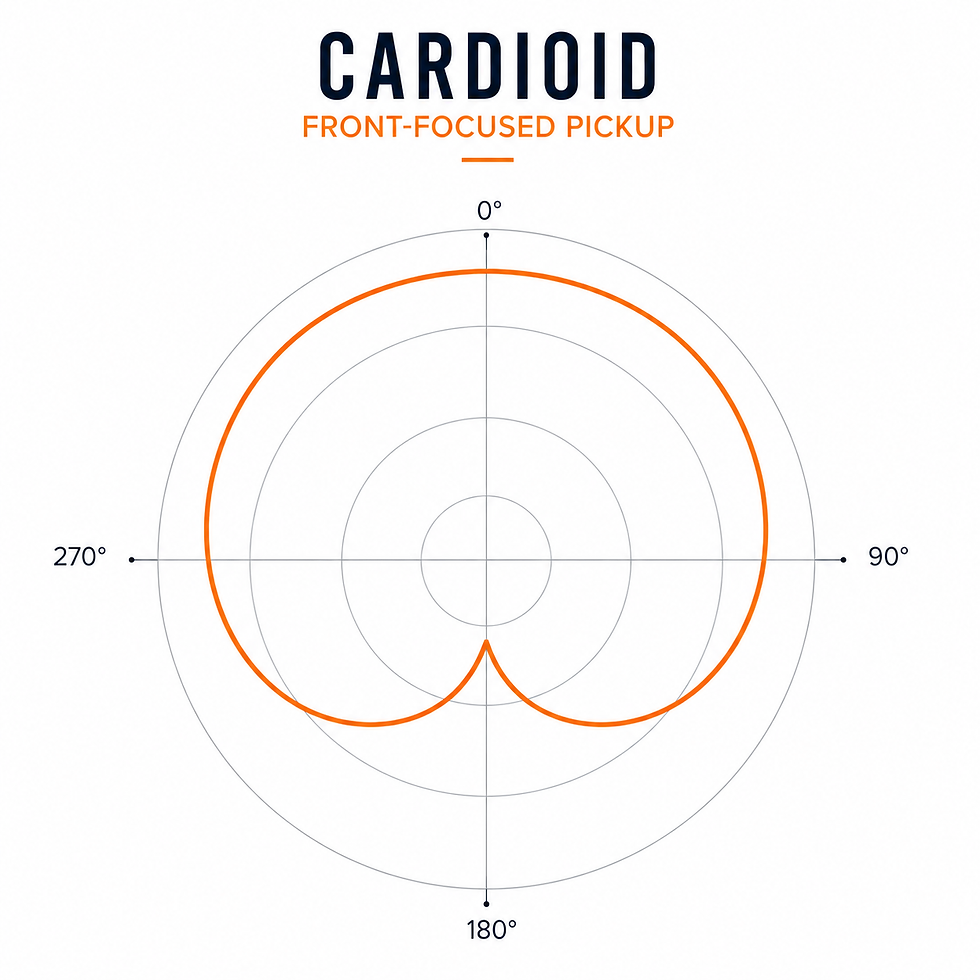
2. Cardioid: The Heart Shape
The most common pattern, Cardioid, picks up sound from the front and rejects it from the rear.
Best for: General vocals and instruments.
The Feedback Secret: To prevent feedback with a Cardioid mic, place your floor monitor directly behind the microphone. Since the "dead zone" (null point) is at 180°, the mic won't pick up the speaker pointed at its back.
3. Supercardioid: The Precision Tool
This pattern is narrower than Cardioid, offering even more isolation from the sides. However, it has a small "lobe" of sensitivity directly at the back.
Best for: Loud stages where you need to reject the drums or guitar amps sitting next to the singer.
The Feedback Secret: Because of that rear lobe, you should never place a floor monitor directly behind a Supercardioid mic. Instead, place two monitors off to the sides (at about 125°). This aims the speakers into the mic’s "null points" rather than its rear pickup zone.

Why "Clean" Rejection Matters for Your Mix
It’s not just about feedback; it’s about Phase and Clarity.
When a singer’s microphone picks up 30% of the drum kit, those drums arrive at the audio console slightly later than the actual drum microphones. This causes "comb filtering", a hollow, thin sound that no amount of EQ can fully fix.
By choosing a microphone with a tight, consistent polar pattern, you ensure that the only thing entering that channel is the intended source. This results in:
More "Gain Before Feedback": You can turn the volume up higher before the system squeals.
Cleaner Livestreams: Your remote audience hears the vocal clearly, not a washed-out version of the entire room.
Easier Mixing: You don't have to fight the "noise" of the stage to find the "signal" of the performer.
The Sapphire Approach: Choosing the Right Tool
There is no "perfect" microphone, only the right one for the job. A microphone that works beautifully for a solo presenter might be a disaster for a lead singer in front of a loud band.
Understanding the "shape" of your microphones allows you to design a stage plot that works with physics rather than against it. At Sapphire, we don't just sell you a box; we help you understand the acoustics of your space so you can choose the patterns that will make your audio shine.
Tired of fighting feedback and muddy mixes? Contact Sapphire to design an audio system that delivers clear, reliable sound from the start.